For tutors and tuition centres

Equipping every tutor with the right tools.

Quillino helps primary math teachers save hours on lesson prep while making abstract math concepts visual, interactive, and measurable

Singaporean tutor running a tuition session with primary students using Quillino on a tablet
Ready for every lesson

Ready-to-use Visual Explorers

Pull up a Visual Explorer in seconds. Walk students through any P1–P6 concept with built-in teaching prompts and visualisation. Eliminate hours coming up with visuals to teach new and tougher concepts. Try the number line below.

Loading demo…
For MOE-trained tutors and non MOE-trained tutors

Prompts that guide you how to use Visual Explorers to teach concepts.

Every visualisation comes with step-by-step teaching prompts. They tell you which questions to ask, which manipulations to demonstrate, and how to bridge from concrete to abstract. New tutors get structure on day one. Experienced tutors save the prep hour.

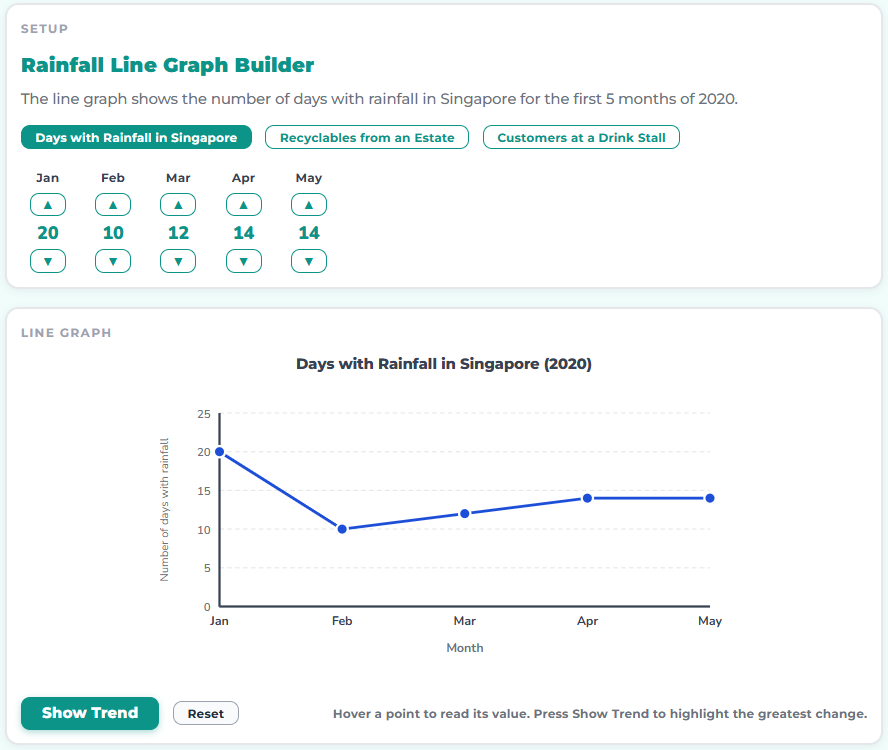
Quillino Rainfall line-graph builder showing monthly rainfall plotted as a line graph.
The Visual Explorer your students use alongside.
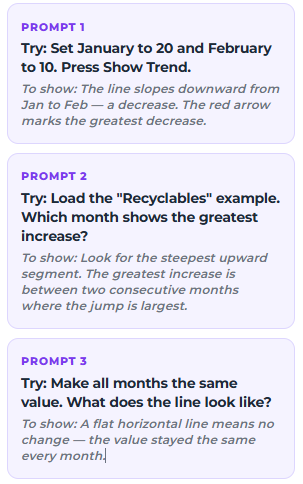
The promptGuided teaching prompt for the Rainfall line-graph Visual Explorer: questions to ask, what to point out, and how to extend.
A worked teaching script for tutors — written by our curriculum team. Ask, observe, then deepen.

One-stop tool for all teachers

Every tutor does the same three things and stitches them together with notebooks, WhatsApp groups, and worksheet stacks. Quillino does all three in one place.

Job 01Tutor drawing on a whiteboard

Teach.

Replace your powerpoint slides with live interactive visualisations. Built-in prompts walk through which questions to ask, which manipulations to demonstrate, and how to make abstract math easy to understand.

New tutors get structure. Experienced tutors save the hour they used to spend pulling worksheets.

Job 02Teacher holding a stack of papers

Manage.

Group students by level or class. Assign visualisations, practice sets, and word problems. See who has done what, today.

No more spreadsheets and group chats to remember who is on which topic.

Job 03Teacher talking to a parent

Report.

Every student has a profile showing their strengths, weakness, improvements, and what to revisit next. Pull up student or class reports in just two clicks.

Parent/School reporting stop eating weekend evenings.

Your dashboard

Twenty students. One screen.

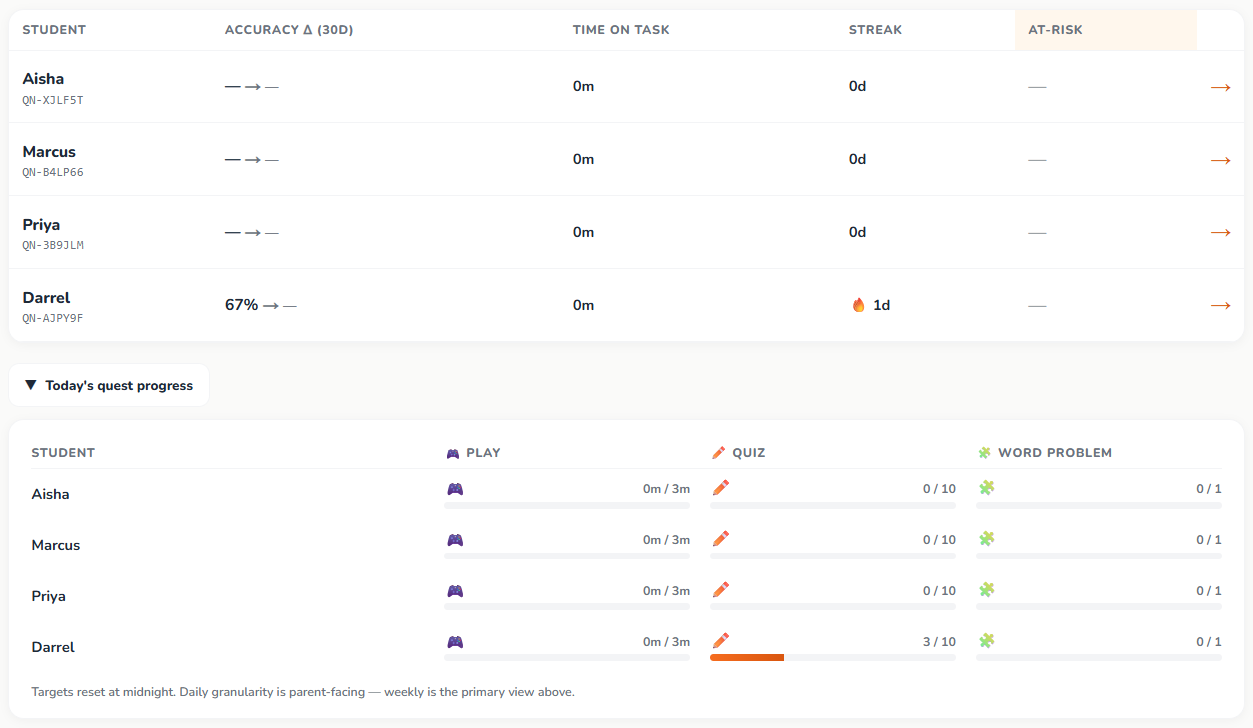
Who’s on track this week, who needs a nudge, who needs you to revisit a topic. In seconds.

Preview
Quillino tutor dashboard showing class roster, per-student weak topics, and weekly recommendations
Daily tracking

Track Student's Performance

Quillino tracks performance, consistency and weaknesses daily, weekly and monthly

Visualise

3 Minutes

Did the student explore the visualisation and use the manipulatives to gain intuition?

Practice

10 questions daily

Increasing practice difficulty for consistent learning, with a 24/7 AI tutor to guide them if they get stuck.

Thinking Critically

1 Word Problem daily

Broken into Understand, Plan, Solve, Check. The student practises reading a problem, not just solving one.

End-of-week reports show which questions students got wrong, which concepts they’re weak in, and which visualisation to use to re-teach each one. You stop guessing what to cover next week.

From tutors using Quillino

What tutors are saying.

In the hands of the right tutor, a single visualisation can be used to teach many different topics. I’ve yet to explore the rest of their visualisations but I’m excited to see what else we can bring to life in math.
Gabriel Soh
MOE curriculum planning & development · Tuition centre TBC
This interactivity keeps my students engaged and allows my tutors to explain difficult concepts easily through visualisation.
Camra Lim
Mathematics tutor · Tuition centre TBC
For tutors

Per-seat, billed monthly.

Add or remove seats as your classes change. More than 5? Drop us a note.

Free Tier

$0

Try Quillino with no commitment.

  • 5 visualisations free at every level (P1–P6)
  • Step-by-step prompts inside each visualisation
Most popular

Tutor seat

$29.99/month

Everything in Free, plus the tools to teach and manage your students.

  • All visualisations unlocked across P1–P6
  • Step-by-step prompts inside each visualisation
  • Multi-student dashboard
  • Analytics across all students
  • Daily tracking across every student
  • Weekly weak-topic reports for parents
  • Personalised recommendations on which visualisations to revisit

Per student

$14.99/student/month

Bundled rate when added under a tutor seat. Everything your student needs to master P1–P6 math.

  • All visualisations unlocked across P1–P6
  • Step-by-step prompts inside each visualisation
  • 99+ adaptive practice levels per topic
  • 24/7 AI tutor that asks questions back, never gives the answer
  • Daily Polya word problem (Understand, Plan, Solve, Check)
  • Performance tracking by topic
  • Weekly weak-topic reports for parents
  • Personalised recommendations on which visualisations to revisit
  • Up to 5 students per tutor seat

More than 5 students?

Private tutors, Tuition centres, organisations or schools, contact us for a discounted bulk pricing

Tutor questions

Yes. The prompts inside each visualisation are specifically built for that. They tell you which questions to ask and how to walk a student through the concept, step by step. Many of our tutors aren’t MOE-trained.

Walk through it with us.

A 15-minute call to show you the dashboard, the teaching prompts, and how a class is set up. We’ll answer pricing questions on the call.